Calligrapher | Chinese Calligr1.0.7
Publisher Description
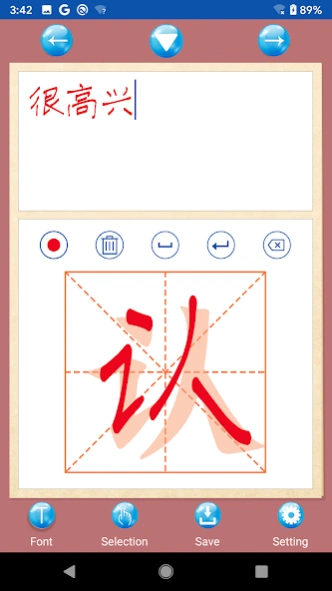


A learning software for practicing Chinese calligraphy
Want to write good handwriting? Want to practice calligraphy on your phone?
Calligrapher is a Chinese character practice application. Through this application, your smartphone instantly transforms into a variety of copybooks for you to practice writing anytime, anywhere.
You can choose any font you like to display on the phone screen, and then use a capacitive pen or finger to copy it on the face, just like practicing calligraphy on a calligraphy copybook.
You can freely adjust the font, color, size, and brush color and thickness of the copybook to suit your preferences.
When encountering a word that you don’t know, you can also browse the dictionary definition, look up pinyin and write stroke order.
As long as you persevere, writing beautiful and good words is not a dream!
The software functions are as follows:
1: Support 9 different types of font modes
2: Animation of writing sequence of words and strokes
3: Support custom words and sentences
4: Display the pinyin of each word
5: Standard writing of each word
6: Support saving handwritten characters
7: Handwriting board mode, support handwriting or drawing
8: Supports writing in different colors
About Calligrapher | Chinese Calligr
The company that develops Calligrapher | Chinese Calligr is hhll tools. The latest version released by its developer is 1.0.7.
To install Calligrapher | Chinese Calligr on your Android device, just click the green Continue To App button above to start the installation process. The app is listed on our website since 2025-08-31 and was downloaded 6 times. We have already checked if the download link is safe, however for your own protection we recommend that you scan the downloaded app with your antivirus. Your antivirus may detect the Calligrapher | Chinese Calligr as malware as malware if the download link to com.hhll.handwriting is broken.
How to install Calligrapher | Chinese Calligr on your Android device:
- Click on the Continue To App button on our website. This will redirect you to Google Play.
- Once the Calligrapher | Chinese Calligr is shown in the Google Play listing of your Android device, you can start its download and installation. Tap on the Install button located below the search bar and to the right of the app icon.
- A pop-up window with the permissions required by Calligrapher | Chinese Calligr will be shown. Click on Accept to continue the process.
- Calligrapher | Chinese Calligr will be downloaded onto your device, displaying a progress. Once the download completes, the installation will start and you'll get a notification after the installation is finished.
Program Details
System requirements
Download information
Pricing
Version History
version 1.0.7
posted on 2025-08-31
1: 升级支持安卓16
version 1.0.6
posted on 2024-07-13
1: 支持安卓SDK34
2: 修复安卓14无法保存写的字图片问题。
version 1.0.4
posted on 2022-12-03
1:修复异常奔溃问题
